# Herramientas de navegación

[![image.png](https://v4.docs.airvi.com.co/uploads/images/gallery/2025-01/scaled-1680-/hQYsI6Ued9ZclBV5-image.png)](https://v4.docs.airvi.com.co/uploads/images/gallery/2025-01/hQYsI6Ued9ZclBV5-image.png)

<table border="1" id="bkmrk-bot%C3%B3n-del-men%C3%BA-princ" style="border-collapse: collapse; width: 100%; height: 205.867px;"><colgroup><col style="width: 21.3839%;"></col><col style="width: 78.5267%;"></col></colgroup><tbody><tr style="height: 46.7614px;"><td style="height: 46.7614px;">[![image.png](https://v4.docs.airvi.com.co/uploads/images/gallery/2025-04/scaled-1680-/9NQgwb60NTLSJuR2-image.png)](https://v4.docs.airvi.com.co/uploads/images/gallery/2025-04/9NQgwb60NTLSJuR2-image.png)

</td><td class="align-left" style="height: 46.7614px;">Botón del Menú Principal: Permite navegar y acceder a todos los módulos del sistema de forma sencilla.</td></tr><tr style="height: 63.6222px;"><td style="height: 63.6222px;">[![image.png](https://v4.docs.airvi.com.co/uploads/images/gallery/2025-04/scaled-1680-/dkQlIqYEur0oxwDg-image.png)](https://v4.docs.airvi.com.co/uploads/images/gallery/2025-04/dkQlIqYEur0oxwDg-image.png)

</td><td style="height: 63.6222px;">Botón de Navegación Atrás: Este botón es funcional cuando hay más de un movimiento en el sistema. Al pulsarlo, podrá retroceder un paso en la navegación.</td></tr><tr style="height: 44.6449px;"><td style="height: 44.6449px;">[![image.png](https://v4.docs.airvi.com.co/uploads/images/gallery/2025-04/scaled-1680-/dQXNxQXlOOEBNRvO-image.png)](https://v4.docs.airvi.com.co/uploads/images/gallery/2025-04/dQXNxQXlOOEBNRvO-image.png)

</td><td style="height: 44.6449px;">Botón Home: Al hacer clic en este botón, será redirigido a la página principal del sistema</td></tr><tr style="height: 50.8381px;"><td style="height: 50.8381px;">[![image.png](https://v4.docs.airvi.com.co/uploads/images/gallery/2025-04/scaled-1680-/lW1Ugri5OesMyxkG-image.png)](https://v4.docs.airvi.com.co/uploads/images/gallery/2025-04/lW1Ugri5OesMyxkG-image.png)

</td><td style="height: 50.8381px;">Botón de Navegación Adelante: Este botón estará habilitado solo si ha utilizado previamente el botón de retroceder. Le permitirá avanzar un paso en la navegación.</td></tr></tbody></table>

##### Alertas del Sistema

<table border="1" id="bkmrk-debajo-de-la-barra-s" style="border-collapse: collapse; width: 100%; height: 97.2266px;"><colgroup><col style="width: 49.881%;"></col><col style="width: 49.881%;"></col></colgroup><tbody><tr style="height: 97.2266px;"><td style="height: 97.2266px;">[![alertas_del_sistema.png](https://v4.docs.airvi.com.co/uploads/images/gallery/2024-12/iXTJDsiQsR7vixQb-alertas-del-sistema.png)](https://v4.docs.airvi.com.co/uploads/images/gallery/2024-12/iXTJDsiQsR7vixQb-alertas-del-sistema.png)

</td><td style="text-align: justify; height: 97.2266px;">Debajo de la barra superior, encontrará las alertas importantes relacionadas con el sistema. Al hacer clic en estas alertas, será dirigido a la sección correspondiente, donde podrá obtener más detalles sobre la causa de la alerta y las posibles soluciones.</td></tr></tbody></table>

##### Botón de Notificaciones

<table border="1" id="bkmrk-el-bot%C3%B3n-de-notifica" style="border-collapse: collapse; width: 100%;"><colgroup><col style="width: 26.8285%;"></col><col style="width: 73.0821%;"></col></colgroup><tbody><tr><td>[![notificaciones.png](https://v4.docs.airvi.com.co/uploads/images/gallery/2024-12/JWBhTimNzdri8phs-notificaciones.png)](https://v4.docs.airvi.com.co/uploads/images/gallery/2024-12/JWBhTimNzdri8phs-notificaciones.png)

</td><td style="text-align: justify;">El botón de notificaciones muestra alertas configuradas que se activan cada vez que se ejecuta una actividad, como pagos o reservas, entre otros.</td></tr></tbody></table>

##### Botón "Más" o "Nuevo"

<table border="1" id="bkmrk-este-bot%C3%B3n-permite-a" style="border-collapse: collapse; width: 100%;"><colgroup><col style="width: 27.5743%;"></col><col style="width: 72.3362%;"></col></colgroup><tbody><tr><td>[![image.png](https://v4.docs.airvi.com.co/uploads/images/gallery/2024-09/scaled-1680-/n5bBLwEfOz1tUAo6-image.png)](https://v4.docs.airvi.com.co/uploads/images/gallery/2024-09/n5bBLwEfOz1tUAo6-image.png)

</td><td style="text-align: justify;">Este botón permite agregar un nuevo elemento. La función específica de este botón varía según el módulo en el que se encuentre.</td></tr></tbody></table>

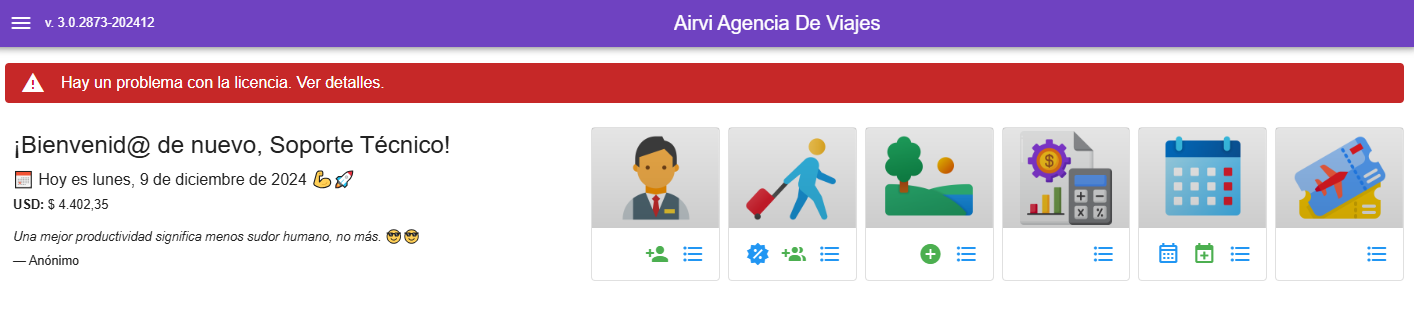
##### Viajes y Reservas

[![image.png](https://v4.docs.airvi.com.co/uploads/images/gallery/2025-05/scaled-1680-/Qhbyj7STVeoO0AyK-image.png)](https://v4.docs.airvi.com.co/uploads/images/gallery/2025-05/Qhbyj7STVeoO0AyK-image.png)

[![image.png](https://v4.docs.airvi.com.co/uploads/images/gallery/2025-05/scaled-1680-/MtUXh8IAIgw0Jhng-image.png)](https://v4.docs.airvi.com.co/uploads/images/gallery/2025-05/MtUXh8IAIgw0Jhng-image.png)

<table border="1" id="bkmrk-bot%C3%B3n-de-viajes%3A-la-" style="border-collapse: collapse; width: 100%; height: 488.266px;"><colgroup><col style="width: 50%;"></col><col style="width: 50%;"></col></colgroup><tbody><tr style="height: 70.375px;"><td style="height: 70.375px;">[![image.png](https://v4.docs.airvi.com.co/uploads/images/gallery/2025-05/scaled-1680-/9uagTg8g1TCdedeI-image.png)](https://v4.docs.airvi.com.co/uploads/images/gallery/2025-05/9uagTg8g1TCdedeI-image.png)

</td><td class="align-left" style="height: 70.375px;">Botón de viajes: La función de este botón es redireccionar al módulo de viajes.</td></tr><tr style="height: 56.375px;"><td style="height: 56.375px;">[![image.png](https://v4.docs.airvi.com.co/uploads/images/gallery/2025-05/scaled-1680-/Rm7zFpiVURCetfop-image.png)](https://v4.docs.airvi.com.co/uploads/images/gallery/2025-05/Rm7zFpiVURCetfop-image.png)

</td><td style="height: 56.375px;">Botón de habitaciones: La función de este botón es redireccionar al módulo de calendario de habitaciones.</td></tr><tr style="height: 56.375px;"><td style="height: 56.375px;">[![image.png](https://v4.docs.airvi.com.co/uploads/images/gallery/2025-05/scaled-1680-/xbHGOgEKaZDNxO58-image.png)](https://v4.docs.airvi.com.co/uploads/images/gallery/2025-05/xbHGOgEKaZDNxO58-image.png)

</td><td style="height: 56.375px;">Botón de clientes: La función de este botón es registrar un nuevo cliente en el software</td></tr><tr style="height: 62.375px;"><td style="height: 62.375px;">[![image.png](https://v4.docs.airvi.com.co/uploads/images/gallery/2025-05/scaled-1680-/v44MXzZZJ6caEcrM-image.png)](https://v4.docs.airvi.com.co/uploads/images/gallery/2025-05/v44MXzZZJ6caEcrM-image.png)

</td><td style="height: 62.375px;">Botón de usuarios y proveedores: La función de este botón es registrar un nuevo usuario o proveedor en el software</td></tr><tr style="height: 66.3906px;"><td style="height: 66.3906px;">[![image.png](https://v4.docs.airvi.com.co/uploads/images/gallery/2025-05/scaled-1680-/TBfeGgItHStLwPKo-image.png)](https://v4.docs.airvi.com.co/uploads/images/gallery/2025-05/TBfeGgItHStLwPKo-image.png)

</td><td style="height: 66.3906px;">Botón de facturas de proveedores: La función de este botón es listar las facturas a proveedores a nivel del viaje y a nivel de reserva</td></tr><tr style="height: 65.375px;"><td style="height: 65.375px;">[![image.png](https://v4.docs.airvi.com.co/uploads/images/gallery/2025-05/scaled-1680-/jPwLxvUtyjwrsgX1-image.png)](https://v4.docs.airvi.com.co/uploads/images/gallery/2025-05/jPwLxvUtyjwrsgX1-image.png)

</td><td style="height: 65.375px;">Botón de apoyo contable: La función de este botón es mostrar el resumen contable, ya sea para la reserva o para el viaje</td></tr><tr style="height: 57px;"><td style="height: 57px;">[![image.png](https://v4.docs.airvi.com.co/uploads/images/gallery/2025-05/scaled-1680-/pchewL6g8wiRm3V1-image.png)](https://v4.docs.airvi.com.co/uploads/images/gallery/2025-05/pchewL6g8wiRm3V1-image.png)

</td><td style="height: 57px;">Botón de editar: La función de este botón es editar él viaje donde podremos hacer cambios que solo afecten a esa salida</td></tr><tr style="height: 54px;"><td style="height: 54px;">[![image.png](https://v4.docs.airvi.com.co/uploads/images/gallery/2025-05/scaled-1680-/Zw6QG1uhfqJToUGH-image.png)](https://v4.docs.airvi.com.co/uploads/images/gallery/2025-05/Zw6QG1uhfqJToUGH-image.png)

</td><td style="height: 54px;">Botón tres puntos: La función de este botón es listar todas las opciones anteriores </td></tr></tbody></table>